



An order reaches your remote team with all the customer details filled in. There’s just one problem. The requested discount needs a manager’s approval.
The processor sends a question and waits. By the next morning, the order is overdue, even though entering it would take minutes.
Back-office outsourcing works better when the handoff explains which records can move ahead and which need a decision. Before assigning work to a remote team, define the required information, approval limits, and next owner. That gives your business process support team a clear way to complete routine work and raise questions without guessing.
Separate Routine Work From Decisions
Routine work has complete information and an approved rule to follow. Entering a verified address or recording an approved price fits that description.
An exception needs something more. It may require a missing document, a correction, or permission to go outside the rules.
Deloitte’s 2020 Global Intelligent Automation survey found that only 38% of organizations had mature process definitions, standards, and management. For teams preparing to delegate work, that finding highlights the need to document how tasks should be handled. Define what processors can complete, what requires correction, and who approves exceptions before records move between teams
Use a simple test for your own tasks. Could two trained employees follow the instructions and reach the same answer? If they need to guess, clarify the rule or identify who decides.
Review Recent Transactions Before Moving The Work
Start with 200–500 recent transactions. Treat this as a practical starting sample for finding workflow problems. Expand it if important transaction types or busy periods are missing.
Choose A Representative Mix
Include different days, shifts, channels, and transaction types. Review completed, rejected, reopened, and unresolved records.
Check rare but serious cases separately. A small sample may miss suspected fraud, unauthorized changes, or other cases that need strict controls.
Record What Actually Happened
For each transaction, capture:
- The required information and whether it was complete.
- Any correction, question, or approval needed.
- Who handled each step.
- Submission, queue, processing, hold, and completion timestamps.
- The outcome and any later rework.
Use specific reasons for delays. “Missing purchase order” tells the next person what’s needed. “Needs review” leaves them investigating again.
Classify Each Record
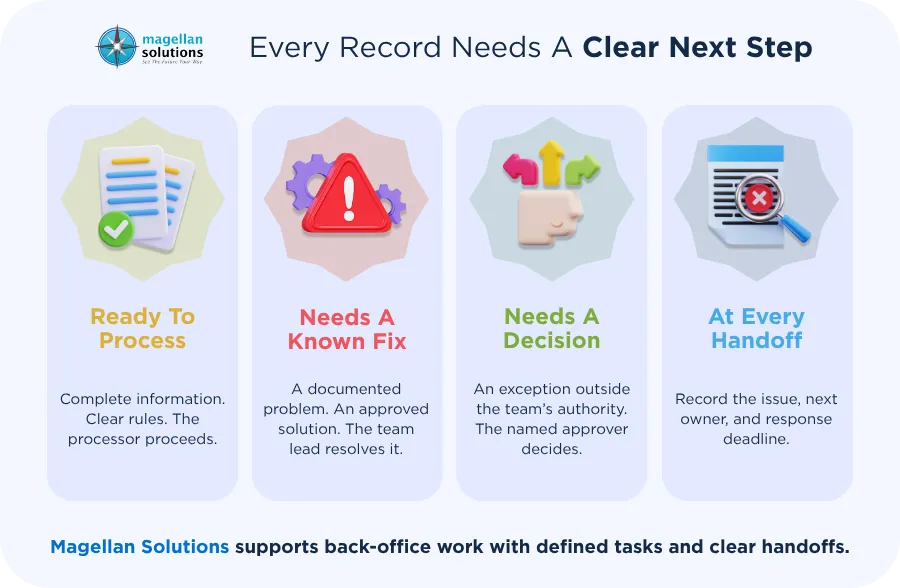
Assign each transaction to one initial category:
Routine-ready. The information is complete, and existing instructions cover the task.
Known exception. A problem exists, but there is an approved way to resolve it.
Decision required. Someone must approve an exception or settle an unclear case.
Have a second reviewer check uncertain classifications. Count each transaction once in this initial assessment and record later escalations separately.
Calculate Your Starting Point
Routine-ready share = Routine-ready records ÷ All sampled records × 100
Exception share = Records needing correction, clarification, or approval ÷ All sampled records × 100
Use the results to identify the work your current instructions support. Repeat the assessment after fixing common gaps.
Keep Routine Processing Separate From Automation
Straight-through processing, or STP, means a transaction finishes automatically without manual intervention.
A person entering a complete record is still doing manual work. Track that separately.
STP rate = Transactions completed without manual intervention ÷ All transactions in scope × 100
The STP rate shows what the system completes automatically. The routine-ready share shows what employees can process using existing rules.
Track accuracy and reopened records alongside both measures. A fast completion creates extra work if another employee has to correct it later.
Build Three Escalation Tiers
Give each type of work an owner with clear authority.
| Tier | What Belongs Here | Who Handles It |
| Tier 1 — Routine Processing | Complete records that pass the required checks. | A processor follows the approved steps. |
| Tier 2 — Known Exceptions | Missing documents, validation errors, or duplicate checks with a documented resolution. | A designated lead applies approved fixes within their authority. |
| Tier 3 — Client Decisions | Policy overrides, disputed information, or approvals outside the processing team’s authority. | A named decision-maker at the client organization. |
Every escalation should include the record ID, the problem, supporting information, and the exact question needing an answer.
Set a response target and backup contact. A request sent to a shared inbox still needs someone responsible for picking it up.
Measure Where Work Waits
Turnaround time, or TAT, shows how long a transaction took. On its own, it cannot explain the delay.
A record might wait before appearing in the remote team’s work list, sit unassigned, or pause for client approval. Lean Enterprise Institute similarly distinguishes processing time from the waiting that contributes to total lead time.
Define the measures before comparing teams.
| Measure | Definition For This Workflow |
| Queue Ingestion Time | From frontline submission until the record appears in the remote team’s work list. |
| Queue Wait Time | From appearing in the work list until a processor first picks it up. |
| Active Processing Time | Time spent working on the record, including corrections. |
| Client Hold Time | Time awaiting a specific answer or approval from the client organization. |
| End-To-End TAT | From frontline submission to final completion. |
Agree on time zones, business hours, and status definitions. When adding durations, keep the categories separate so the same time is counted once.
If records arrive through an overnight batch, check the transfer schedule. If records are visible but untouched, check assignment rules and coverage. Each delay needs a different fix.
Record Tier 3 Holds Without Hiding Delays
A service-level agreement, or SLA, defines the promised response or completion time. Agree which holds can pause its clock and what evidence is required.
The following illustrative example uses one shared business-hours calendar. The SLA starts when the record enters the queue.
| Event | Time | SLA Status | Required Record |
| Record enters the queue | 09:00 | Running | Queue timestamp |
| Processor requests client approval | 09:20 | Paused under agreed rules | Specific question and named approver |
| Usable approval arrives | 11:20 | Running again | Approval and receipt timestamp |
| Processing finishes | 11:40 | Complete | Completion timestamp |
Elapsed time is 2 hours 40 minutes. The approved client hold is 2 hours. SLA-counted time is 40 minutes.
SLA-counted time = Elapsed time within the agreed SLA window − Approved hold intervals within that window
Those counted minutes can include queue waiting. Measure hands-on work separately.
A Tier 3 label should have a valid pause reason under the agreement. Keep the full turnaround time visible, with an owner and follow-up date for every open hold.
Prepare Your Handoff For Back-Office Outsourcing
If your staff keeps answering the same processing questions or chasing approvals, talk to Magellan Solutions about the routine work you want to assign to a remote team. Bring a sample of the records that get stuck so the discussion can cover responsibilities, instructions, and the decisions your staff needs to keep.
Talk To Us About Your Back-Office Work
Frequently Asked Questions About Workflow Handoffs
Can The Remote Team Handle Tier 2 Exceptions?
Yes, when it has the training, access, and authority to apply approved fixes. Document those limits and explain which cases must move to Tier 3.
What Happens If The Client Doesn’t Reply?
Keep the record visible with its age, owner, and next follow-up date. Use the agreed backup contact. A paused SLA still needs someone managing the outstanding decision.
When Should An Exception Become Routine Work?
When the process owner approves a repeatable rule. Update the instructions and examples, train the team, and check early results before applying the rule more widely.
Implementation Checklist
- Review a representative sample of recent transactions.
- Define the information and checks required before processing.
- Measure routine-ready work and actual STP separately.
- Assign three tiers with authority limits, owners, and backups.
- Track ingestion, queue waiting, processing, and client holds.
- Agree on SLA pauses while retaining full turnaround reporting.
- Pilot the handoff, check accuracy, and update unclear rules.
A scalable offshore partnership needs these task categories and responsibilities documented. Clear instructions let dedicated processors move complete records quickly while exceptions reach the people authorized to resolve them.