

High-value talent rarely leaves a company because the work is too challenging—they leave, or burn out, because their days are consumed by administrative busywork. When experienced project managers, sales directors, and clinical leads spend hours manually matching invoices, rekeying customer records, or chasing missing intake forms, business growth hits an immediate ceiling.
Keeping every back-office routine inside your four walls isn’t a badge of operational excellence; it is a hidden tax on your team’s capacity. Every hour your specialized staff spends on routine paperwork is an hour stolen from closing deals, refining services, and keeping clients happy.
Strategic delegation changes this dynamic entirely. By shifting repetitive administrative workflows to dedicated small-business back-office outsourcing partners, forward-thinking operations leaders eliminate processing bottlenecks, stabilize overhead, and free their core teams to focus on revenue-generating work.
What Does Back-Office Outsourcing Actually Cover?
Unlike front-office roles that focus on direct client contact—such as live inbound support or active sales outreach—back-office operations are the behind-the-scenes engine that keeps a company running smoothly.
When internal employees handle these non-client-facing tasks, they lose valuable momentum to manual data processing.
Back-office outsourcing is not just a cost-cutting move for small businesses. In a survey of 517 U.S. small-business leaders, 83% said they would maintain or increase spending on outsourced business services in 2023. Transferring these repetitive tasks to a dedicated remote team ensures accurate, uninterrupted work while avoiding the costs of expanding local payroll.
1. Accounting, Billing & Invoicing Workflows
Financial administration causes constant operational drag. Managing day-to-day accounts payable, customer billing, and vendor receipts internally often leads to delayed invoices, missed payment windows, and disorganized records.
Outsourcing your financial back office keeps billing on schedule, tracks incoming payments reliably, and keeps your books up to date without taking time away from leadership.
Core Tasks Handled
- Invoice Generation & Distribution: Preparing and sending client invoices as soon as services are delivered or project milestones are met.
- Accounts Payable & Receivable Tracking: Monitor payment statuses, reconcile bank statements, and promptly process vendor bills.
- Expense Categorization: Organizing receipts and recurring bills inside your accounting software to keep books audit-ready year-round.
What to Keep In-House: High-level financial strategy, tax planning, budgeting decisions, and final authorization on high-value corporate expenditures.
Operational Impact: Eliminates payment delays, improves cash flow visibility, and keeps financial records accurate week after week.
2. Data Entry, Document Formatting & Digitization
Manual data entry keeps records organized, but having internal staff type entries wastes company resources. Keying information from physical forms, updating CRM fields, or reformatting legacy files can easily consume hundreds of staff hours every year.
Outsourcing data processing converts physical documents into structured digital files quickly, using systematic double-checks to keep error rates remarkably low.
Core Tasks Handled
- CRM & Database Updates: Add new customer details, update communication preferences, and remove duplicate files.
- Document Scanning & File Tagging: Converting paper intake forms, receipts, or contracts into searchable digital assets.
- Order Entry Processing: Logging incoming customer purchase orders from email attachments or paper slips straight into your inventory software.
What to Keep In-House: Master database architecture design, core data access policies, and proprietary business logic definition.
Operational Impact: Accelerates database updates, eliminates simple typing mistakes, and frees your team from tedious spreadsheet maintenance.
3. Administrative Intake & Customer Record Management
For service providers, medical practices, and professional firms, gathering initial client details requires strict precision. Front-desk staff frequently get overwhelmed trying to verify registration details and scan IDs while simultaneously managing walk-ins and incoming calls.
Moving routine intake to an administrative support team ensures records are fully checked and uploaded well before a client meeting or appointment.
Common Administrative Breakdown vs. Outsourced Fix
- The Problem: Rushed staff scrambles through manual intake forms, leading to missing details, wrong contact info, or delayed file creation.
- The Impact: Appointment delays, frustrated clients, and administrative backlogs during peak business hours.
- The Fix: A dedicated back-office team verifies digital intake, sets up files, and updates records before local staff step in.
What to Keep In-House: In-person client greetings, high-touch consultation meetings, and complex clinical or legal advisory interactions.
4. HR Support, Recruitment Admin & Onboarding
As your business grows, managing HR paperwork becomes a heavy operational lift. Sorting through stacks of resumes, coordinating interview times, and tracking new-hire documents takes valuable time away from team managers.
Delegating hiring administration keeps your talent pipeline moving smoothly without clogging your managers’ calendars with scheduling back-and-forth.
Core Tasks Handled
- Resume Screening & Shortlisting: Reviewing incoming applications against your exact requirements to filter out unqualified applicants.
- Interview Scheduling: Coordinating calendar availability between applicants and hiring managers to eliminate email tag.
- Onboarding Document Collection: Gathering tax forms, signed policy disclosures, and IDs from new hires before their start date.
What to Keep In-House: Final interview selections, cultural fit evaluations, performance reviews, and salary negotiations.
Operational Impact: Shortens hiring timelines, keeps recruitment organized, and lets managers focus on evaluating top candidates.
5. Inventory Management, Order Processing & Fulfillment Support
For e-commerce stores, wholesalers, and retail businesses, tracking stock levels and processing orders requires constant oversight. Missing stock updates or delayed tracking numbers lead to stockouts, shipping delays, and unhappy customers.
Back-office logistics support keeps stock counts balanced across all your sales channels so orders move smoothly from payment confirmation to final delivery.
Core Tasks Handled
- Order Verification: Reviewing purchase orders for correct pricing, valid delivery addresses, and current stock availability.
- Stock Level Monitoring: Tracking product movement across fulfillment points and flagging items that need reordering.
- Shipping & Tracking Updates: Enter tracking numbers into client portals and keep buyers informed about their shipments.
What to Keep In-House: Supplier relationship negotiations, product development, and core warehouse security oversight.
Operational Impact: Clears order-fulfillment backlogs, speeds delivery times, and keeps inventory databases accurate.
6. Reporting, Analytics & Quality Assurance Audits
Sound decisions require clean data, but pulling metrics from different tools and formatting them into weekly spreadsheets takes hours you don’t have.
A back-office support team compiles data from your CRM, analytics tools, phone systems, and billing software into easy-to-read executive dashboards.
Core Tasks Handled
- Weekly Performance Reporting: Compiling key business metrics into concise summary reports for quick management reviews.
- Data Cleansing & Auditing: Running regular checks across customer databases to fix formatting errors and remove outdated entries.
- Compliance Document Review: Auditing operational files to confirm all required signatures and disclosures are logged.
What to Keep In-House: Executive strategic decision-making, quarterly business goal setting, and capital allocation strategy.
Operational Impact: Gives leadership clear visibility into performance metrics without wasting hours manually building spreadsheets.
Core Functions at a Glance
| Back-Office Function | What to Outsource | What to Retain In-House |
| Finance & Billing | Accounts payable/receivable & invoicing | Financial strategy & budget approval |
| Data Processing | CRM entry & document digitization | Database architecture & access rules |
| Client Intake | Digital intake verification & file setup | In-person greetings & expert consults |
| HR Administration | Resume screening & onboarding paperwork | Final hiring decisions & negotiations |
| Order Logistics | E-commerce order entry & stock tracking | Supplier deals & product development |
| Business Reporting | Weekly dashboard building & audits | Executive strategy & goal setting |
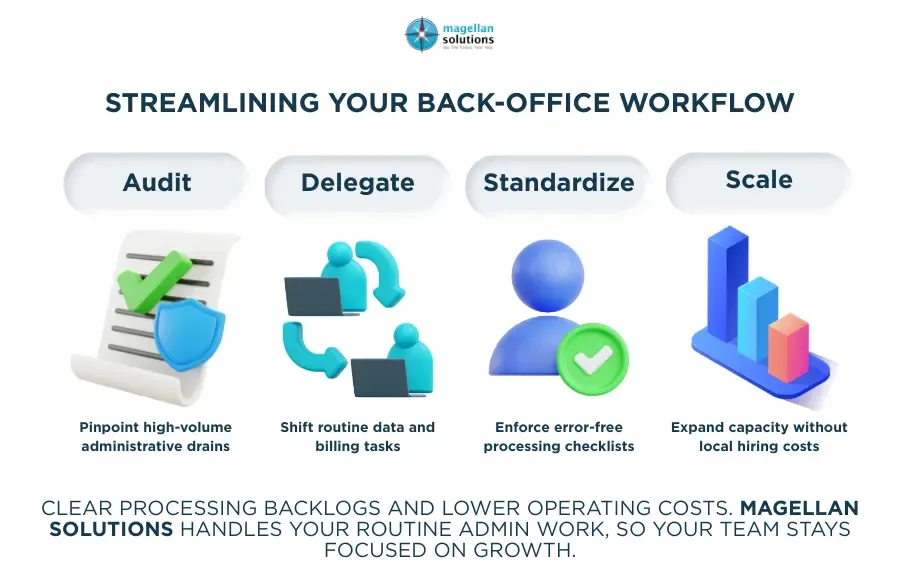
Streamline Your Back-Office Operations
Handling heavy data entry, invoice tracking, and customer records internally can quickly overwhelm your core team. Partnering with Magellan Solutions gives your business dedicated back-office BPO support built to process repetitive administrative tasks quickly and accurately.
Administrative bottlenecks shouldn’t keep you from expanding. Speak with our BPO support team today to see how tailored back-office support can eliminate processing backlogs, lower overhead costs, and keep your business moving forward.
Frequently Asked Questions
1. How does back-office outsourcing help small businesses save money?
Outsourcing removes the heavy overhead of full-time local hires, including salaries, health benefits, office equipment, hardware, and extra software licenses. You pay only for the administrative support capacity you actually need.
2. Is back-office outsourcing safe for sensitive client data?
Yes. Professional BPO providers follow strict data security standards, ISO certifications, HIPAA guidelines for healthcare records, non-disclosure agreements, and encrypted server access to keep your business records completely secure.
3. What is the difference between front-office and back-office outsourcing?
Front-office outsourcing covers direct client communications, like inbound customer phone support, live chat, and sales calls. Back-office outsourcing focuses on internal administrative work, such as data entry, billing, inventory tracking, and reporting.
4. How do I maintain control over my processes when outsourcing?
You set your standard operating procedures (SOPs) and key goals. The outsourced team follows your exact instructions, provides regular activity logs, and stays in daily contact with your operations manager.
5. What software systems can an outsourced back-office team use?
Remote support teams work directly within your existing software setup, including CRMs (Salesforce, HubSpot), accounting systems (QuickBooks, Xero), ERP tools, Google Workspace, and specialized industry portals.
6. Can small businesses start with a small back-office team?
Yes. Back-office support scales easily. Many small businesses start with one or two dedicated specialists to handle specific backlogs, then scale up as workload increases.
7. How quickly can a back-office support team be onboarded?
Depending on your process complexity, dedicated back-office specialists can usually be trained on your SOPs, granted access, and fully operational within a few weeks.
Key Takeaways
- Spot the hidden costs: Repetitive administrative tasks drain high-value staff hours—offload routine work to protect core productivity.
- Define internal boundaries: Keep strategy, final decisions, and high-touch relationships in-house while delegating routine execution.
- Standardize your handoff: Use simple task checklists to ensure smooth delegation to remote support teams.
- Maintain data accuracy: Dedicated back-office specialists run quality checks on billing, CRM, and order records.
- Stay focused on growth: Hand off manual typing, scheduling, and portal checks so leadership can stay focused on overall strategy.