

It is a frustrating loop that software, SaaS, and mobile app teams know all too well:
A customer calls in stressed because something in your app failed mid-workflow. A frontline support agent writes a hurried ticket stating, “Customer says checkout is broken.” Two hours later, an engineer picks up the ticket, tries to test it on their own machine, and closes it with three demoralizing words: “Cannot Reproduce Issue.”
Support is forced to call the irritated customer back to ask the exact same questions. The customer wonders why nobody listened the first time, developers lose valuable sprint momentum, and the bug stays live in production.
Breaking this cycle doesn’t require technical degrees for your frontline staff—it simply requires a shift in how they communicate. Equipping your tech support services team to collect developer-ready context on the initial call eliminates back-and-forth delays, speeds up patch releases, and protects engineering sprint velocity.
What Engineering Actually Needs (And Why “It’s Broken” Doesn’t Cut It)
Developers are not being difficult when they ask for more detail—they genuinely cannot fix what they cannot recreate. If an engineer cannot replicate a glitch in their local environment, pushing a speculative code change risks breaking other parts of the platform.
To build an actionable, one-touch bug report, support agents need to capture seven basic building blocks:
- Exact Steps to Reproduce: The precise, chronological sequence of clicks, taps, or keystrokes the user took right before the glitch appeared.
- Expected vs. Actual Result: What did the user intend to accomplish, and what actually happened on their screen? (e.g., “Clicked ‘Download Invoice’ expecting a PDF, but the button greyed out and nothing downloaded.”)
- Device & Environment Details: The operating system (macOS Sonoma, Windows 11, iOS 17), browser name and build version (Chrome v124, Safari v17), or mobile app release version.
- Account & Workspace Info: The specific User ID, account email, tenant name, or permission role (e.g., Admin vs. Read-Only).
- Timestamp & Frequency: Exactly when the incident occurred, and whether it happens every single time, intermittently, or only once.
- Error Artifacts: Exact system error text, HTTP status codes (like 403 or 500), console logs, and annotated screenshots or screen recordings.
- Business Impact: Whether the issue stops operations in their tracks or has a workable detour.
When frontline intake misses these basics, teams burn massive operational overhead. In a Deloitte study across 15 enterprise organizations, researchers found that 20% of support cases are improperly tagged or labeled as “Other”—severely crippling root-cause analysis and developer handoffs [1].
Translating Customer Frustration into Developer Context
Customers do not think in HTTP requests, database queries, or browser caches. They think in terms of missed deadlines and broken workflows.
A great support agent knows how to listen to emotional language, filter out the stress, and record the underlying technical story.
| How Customers Describe the Problem | What Support Hears | What Developers Need in the Ticket |
| “The checkout page is totally dead, I can’t buy anything!” | Payment submission fails on desktop checkout. | HTTP 500 error on POST /api/v2/checkout when clicking ‘Complete Order’ on Chrome v124 (macOS). Card tokenization succeeds, but order summary hangs. |
| “My dashboard just vanished after lunch.” | Visual rendering failure after user authenticates. | Blank white screen on /dashboard view for Tenant ID #8841 on role ‘Manager’ right after the v2.4.1 hotfix deployment. |
| “Your mobile app is painfully slow today.” | Severe UI latency during batch data exports. | App hangs at 90% progress bar when exporting CSV reports containing over 5,000 records on Android 14 (Build v3.2.0). |
How to Ask the Right Questions Without Interrogating the Caller
When someone is already frustrated with broken software, rapid-firing technical questions will make them defensive.
The secret is using conversational, collaborative phrasing that positions the support agent as their partner in solving the puzzle:
1. Pinning Down Steps to Reproduce
- Robotic: “List every action you performed prior to system failure.”
- Human: “If I open up a test account right now to walk in your shoes, what exact buttons should I click to see what you’re seeing?”
2. Finding Out What Device They Are Using
- Robotic: “What client build and user agent string are you operating?”
- Human: “Are you using our desktop program or logging in through a browser like Chrome or Safari? Do you happen to be on a Mac or a Windows PC?”
3. Understanding Scope and Frequency
- Robotic: “Is this defect continuous or intermittent?”
- Human: “Did this start out of the blue today after a particular action, or have you noticed it happening on and off throughout the week? Are your teammates running into the same thing?”
4. Evaluating Workarounds
- Robotic: “State your operational degradation level.”
- Human: “Is this completely blocking you from completing your work today, or is there another screen or shortcut you’re able to use for now?”
Severity vs. Priority: Don’t Confuse User Impact with Sprint Deadlines
A frequent point of friction between customer support leads and product engineering managers is the confusion between Severity and Priority.
- Support determines Severity: How severely is the customer’s day-to-day operation impacted?
- Product and Engineering determine Priority: When does the fix get scheduled into an active sprint or release pipeline?
To keep this relationship healthy, support teams should focus strictly on documenting real-world user impact:
Severity (Flagged by Support — Impact on the User)
- Critical: Core service is completely inaccessible for multiple accounts/tenants, and there is no workaround. The customer cannot conduct business.
- Major: A core feature is broken or severely degraded. It disrupts daily work, but a viable workaround exists (e.g., users can export via web instead of mobile).
- Minor: An isolated bug affecting a single user, an edge-case setting, or a cosmetic UI defect (e.g., misaligned text or button styling).
Priority (Assigned by Engineering — Placement in the Backlog)
- P1 (Immediate Hotfix): Stop current tasks, create an immediate patch, and deploy as soon as tested.
- P2 (Next Deployment): Schedule the fix into the current active sprint cycle.
- P3 (Backlog): Log the ticket in the engineering backlog for upcoming maintenance sprints or product iterations.
When support agents clearly state the blast radius (one user vs. all users) and whether a workaround is available, engineering managers can prioritize work based on genuine business impact rather than panic.
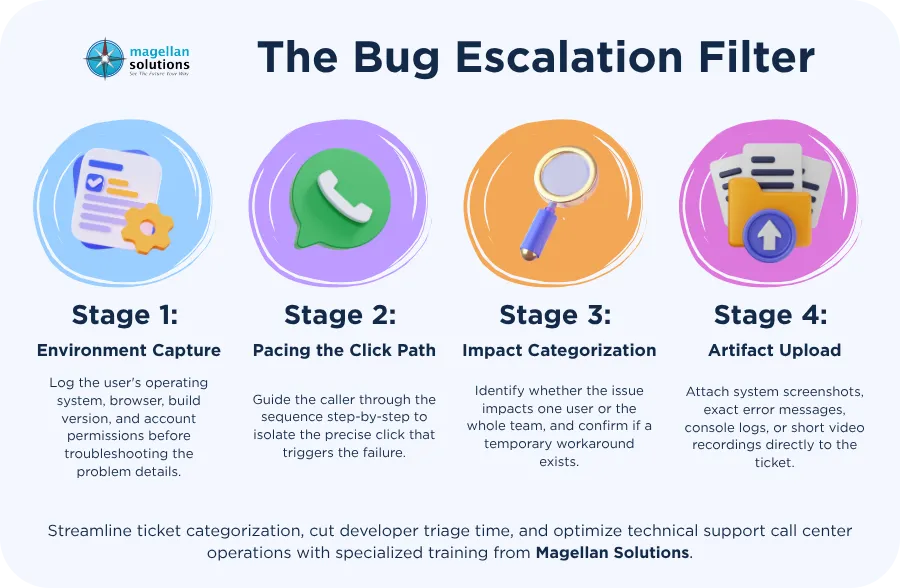
Operational Blueprint: The Bug Escaler Filter
Standardizing how your inbound support reps handle technical calls ensures developers receive consistent, actionable data every single time.
Closing the Loop: Keep the Customer in the Loop
Logging the ticket is only half the equation. Leaving a customer hanging after a stressful bug report damages brand trust.
Train agents to close technical calls with three clear steps:
- Set Realistic Expectations: Never promise an instant fix on a live call. Instead, reassure the caller that their issue has been properly documented:
“I’ve gathered all the steps and environment details and passed them directly to our engineering escalation team so they can test the fix.” - Hand Over a Tracking Identifier: Give the caller clear visibility into their ticket:
“Your case number is #48219. I’ve sent a summary directly to your email, and you can reply to that thread at any point if you have extra screenshots or details.” - Notify on Resolution: When an engineering patch rolls out, close the loop. Send an automated or personal notification letting the customer know that the bug they flagged has officially been resolved in the latest update.
Standardized Bug Report Template for Support Tickets
To keep software tickets organized, frontline support agents can copy and use this clean, standard text layout directly in ticketing systems like Jira, Linear, Zendesk, or Freshdesk immediately following a call:
(BUG REPORT) Short, Clear Summary of the Issue
- ISSUE OVERVIEW
- Customer Summary:
- Expected Behavior:
- Actual Behavior:
- STEPS TO REPRODUCE
- Go to ‘…’
- Click on ‘…’
- Enter input ‘…’
- Error occurs when:
- ENVIRONMENT & ACCOUNT DETAILS
- Account / User / Tenant ID:
- User Role / Permissions:
- Device & Operating System:
- Browser / Mobile App Build:
- Environment (Production / Staging):
- FREQUENCY & TIMELINE
- First Observed (Date, Time, Timezone):
- Reproducibility (Always / Intermittent / One-time):
- IMPACT & SEVERITY ASSESSMENT
- Scope of Impact: [Single User] [Entire Organization] [Multiple Tenants / All Users]
- Workaround Available: [Yes – explain below] [No]
- Suggested Severity: [Critical] [Major] [Minor]
- ARTIFACTS & LOGS
- Error Text / Error Codes:
- Console Log / Network Snippet:
- Screenshots or Screen Recording Links:
Upgrade Your Technical Support Operations with Magellan Solutions
Scaling a software company requires strong alignment between your frontline customer care team and your core engineering squads. When your support tier captures clean, developer-ready diagnostics on the first contact, your engineers spend less time chasing ghosts and more time shipping value.
Magellan Solutions provides specialized technical support call center teams alongside full-service help desk management to handle ticket triage, environment verification, and multi-tier developer escalation workflows. Backed by ISO 27001 data security standards, our teams help SaaS and technology providers reduce back-and-forth customer inquiries, protect developer sprint capacity, and accelerate bug resolution.
To learn how our technical support specialists can elevate your customer experience, contact our team today.
Frequently Asked Questions
What is the difference between a help desk and a technical support call center?
A standard help desk handles general service requests such as password resets, basic account provisioning, billing inquiries, and feature navigation. A dedicated technical support call center focuses on deeper product troubleshooting, replicating system bugs, capturing device environments, and building structured escalation tickets for engineering teams.
How can call center agents capture technical logs from non-technical callers?
Agents can use gentle, step-by-step verbal prompts, guided screen-sharing sessions, or automated diagnostic tools that generate device and browser logs with the customer’s permission, eliminating the need for callers to understand code.
Why is standardized bug intake critical for software companies?
Standardizing bug reporting prevents vital details from being missed, eliminates repetitive calls back to the customer, stops duplicate issues from entering the backlog, and allows developers to reproduce and patch defects quickly.